Custom Printing Artwork Guidelines
Below you will find our guidelines for correctly preparing your artwork. By adhering to these specifications you can ensure that the file format, resolution, bleed, color mode, etc, are perfectly set up for optimal results.
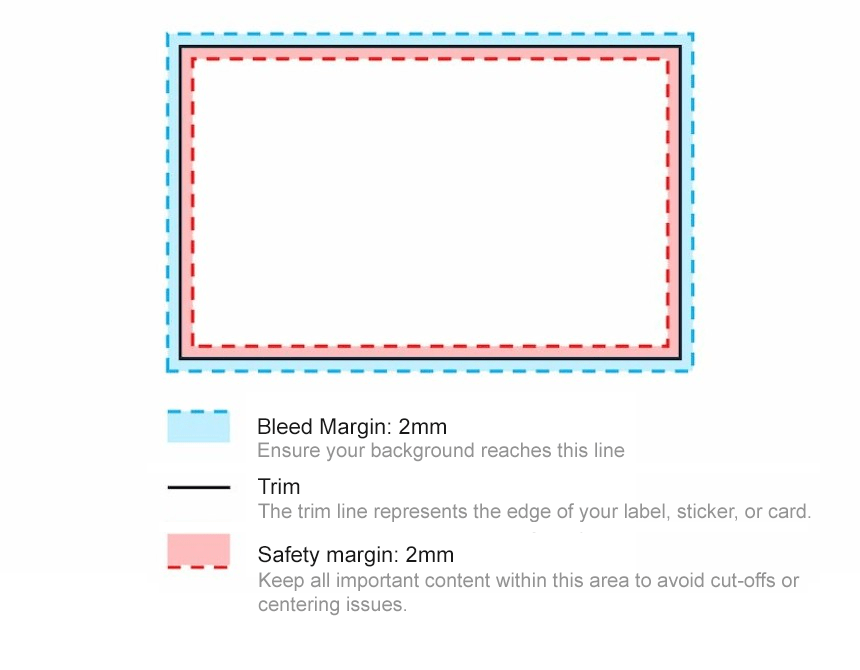
The Essentials
The following guidelines apply to all Avery custom printed products - labels, stickers, and cards.
- File format: PDF (recommended), JPEG, PNG
- Maximum file size: 15MB
- Colour profile: CMYK , RGB (CMYK preferred. RGB images will be automatically converted to CMYK during upload)
- Image resolution: 300 ppi
- Bleed margin: 2mm (outside of trim)
- Safety margin: 2mm (inside of trim)
FONT SIZING:
To ensure readability, we recommend you do not use font sizes smaller than 6 points (2.1 mm). If using a PDF file format, please ensure that all font elements are embedded for best results.
QR CODES:
Size: Min. 10mm (recommended 20mm)

Got questions?
Our customer service team is ready to help!
Our customer service team is available:
Monday to Friday:
8:00am - 4:30pm (AEST / AEDT)
Phone: 1800 644 353
Email: [email protected]
Live chat: During our operating hours, feel free to use our live chat for assistance.